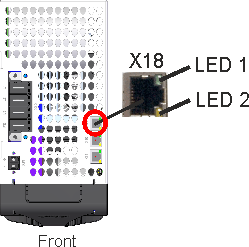
Service Interface (X18)
|
Operating, position control, and motion-block parameters can be set up withWorkBench on an ordinary commercial PC. |
Connect the service interface X18 to an Ethernet interface on the PC directly or via a network switch. The cable can be connected/disconnected to/from X18 with power on.
|
|
The X18 service port of an MKD-C does not allow access to MKD-N drives connected to another MKD-C devices. |

Confirm that the link LED on the MKD-C (the green LED on the RJ45 connector) and on your PC (or network switch) are both illuminated. If both lights are illuminated, then you have a good electrical connection.
|
LED# |
Name |
Function |
|---|---|---|
|
LED1 |
Link |
ON = active, OFF= not active |
|
LED2 |
Activity |
ON = running, OFF = not running |
Pinout
|
Pin |
Signal |
Pin |
Signal |
|---|---|---|---|
|
1 |
Transmit + |
5 |
n.c. |
|
2 |
Transmit - |
6 |
Receive- |
|
3 |
Receive+ |
7 |
n.c. |
|
4 |
n.c. |
8 |
n.c. |
Service Bus Protocols
|
Protocol |
Type |
|---|---|
|
Ethernet TCP/IP |
Service Bus, 100 Mbit/s |
|
|
Network hubs and transfer rate of 10 Mbit/s are not supported. |


